5. What Is a Component?
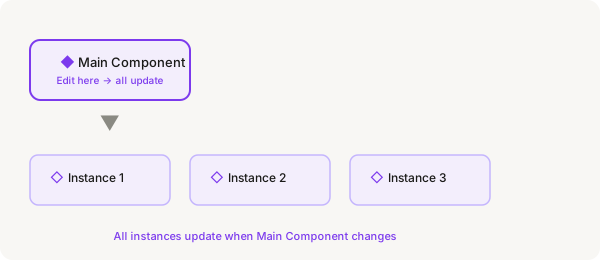
A component is a reusable design element. You make it once, then place copies (called "instances") wherever you need them. If you update the original (the "Main Component"), all copies update automatically. This is how professional designers work — no more editing the same button 50 times.
Main Component vs Instance
| Term | Icon | What it is |
|---|---|---|
| Main Component | Filled diamond ◆ | The original. Edit this, and all instances update. Usually kept in a dedicated page. |
| Instance | Outline diamond ◇ | A copy placed on your canvas. You can override text, colors, and visibility — but the structure stays linked to the Main Component. |
How to create a component
- Select a layer (or group of layers) on your canvas — for example, a rounded rectangle with some text for a button
- Right-click → Create Component (or press Ctrl + Alt + K on Windows, Cmd + Option + K on Mac)
- The selection turns purple in the Layers panel, and shows a filled diamond icon
- Double-click the name in the Layers panel and give it a meaningful name like "Primary Button"
How to use instances
- Select the Main Component on the canvas
- Press Ctrl + D (Windows) or Cmnd + D (Mac) to duplicate it — this creates an instance
- Or, go to the Assets panel (left sidebar, tab at the top) — find your component there
- Drag it from the Assets panel onto the canvas to create a new instance
- Notice the icon in the Layers panel is now an outline diamond — that's how you know it's an instance
Editing a component
- Find the Main Component (filled diamond icon) — either on your canvas or in the Assets panel
- Double-click it to enter it (or right-click → Edit main component)
- Make your changes — change the color, resize, edit text, whatever you need
- Press Escape to exit the Main Component
- All instances on your canvas will have updated automatically
Override vs edit
You can change text or colors on an instance without affecting the Main Component. This is called an "override." But if you change the structure (add/remove layers, change the frame type), do it in the Main Component — or detach the instance first (right-click → Detach).
Why components matter
- Consistency — every button, card, or icon looks exactly the same
- Efficiency — change one thing and everything updates
- Scalability — make complex elements like cards, list items, and nav bars as components
- Team work — components in a shared library let the whole team use the same design system
Try it right now
Draw a rectangle (rounded corners, blue fill). Add text on top that says "Click Me". Select both and create a component (Ctrl + Alt + K). Duplicate it a few times. Then edit the Main Component's color — watch all instances change instantly. That's the power of components.