3. Understand Hug, Fixed, and Fill
Every Auto Layout frame has a width setting and a height setting. Each one can be set to Hug contents, Fixed, or Fill container. These control how the frame behaves when its content changes or when its parent frame changes size.
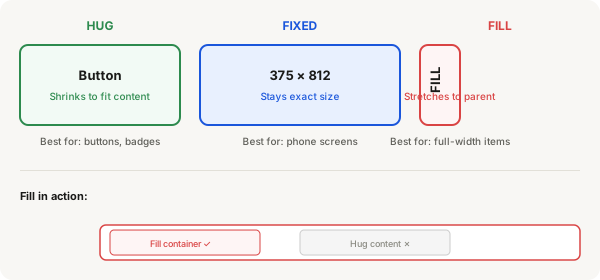
| Setting | What it does | Best for |
|---|---|---|
| Hug contents | The frame shrinks or grows to exactly fit whatever is inside it. This is the default. | Buttons, badges, cards that should match their content size |
| Fixed | The frame stays at an exact size no matter what. You type a number and it locks. | Phone screens, sidebars, containers that need consistent dimensions |
| Fill container | The frame stretches to fill the space given to it by its parent frame. | Items in a nav bar, search bars, anything that should span full width |
How to change it
- Select the Auto Layout frame
- In the right panel, under Auto Layout, find the W (width) and H (height) fields
- Click the dropdown arrow next to the W or H value
- Choose Hug, Fixed, or Fill
When to use each
Hug (default)
- Use for buttons — when you change the text, the button automatically grows or shrinks
- Use for individual cards that might have different amounts of content
- Use when you want the frame to be "just big enough"
Fixed
- Use for a phone screen frame that must stay exactly 375 wide
- Use for a sidebar that should always be the same width
- Use when dimensions must never change
Fill
- Use for items inside a horizontal nav bar that should spread across the full width
- Use for a search bar that should stretch to fit its container
- Only works when the parent frame has Auto Layout and a Fixed or Fill width
Important: Fill only works when the parent gives space
If the parent frame has Hug width, there is no fixed space for the child to fill. The child will collapse to nothing or behave unexpectedly.
Correct setup:
Parent (Auto Layout, Fixed width 375)
└── Child (Auto Layout, Fill container) ✓ Works
Incorrect setup:
Parent (Auto Layout, Hug width)
└── Child (Auto Layout, Fill container) ✗ Won't stretch