22. Use Boolean Properties (Show/Hide Elements)
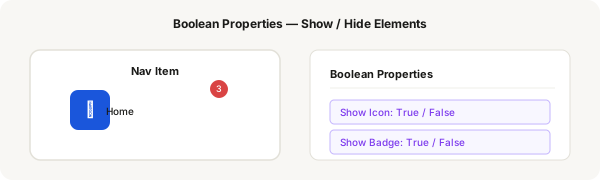
Boolean properties let you toggle the visibility of specific elements in a component — like showing/hiding a notification badge, an icon, or a label. They're true/false switches that control entire layers.
Step-by-step
- Create a nav item component: an icon frame (48×48) with a label below it, wrapped in vertical auto layout
- Add a badge to the icon: a small red circle (16×16) with a number inside, positioned at the top-right of the icon area
- Select the badge layer (circle + number) and look at the Properties panel
- Click the + icon next to Boolean and name it "Show Badge"
- The layer now has a toggle. When Show Badge = On: badge is visible. When Off: badge is hidden
- Repeat: add a boolean for "Show Icon" — toggle the entire icon layer on/off
- Add a text property for the label text as well
- Create an instance of the component. In the Properties panel, toggle Show Badge on/off. Toggle Show Icon on/off
- Combine boolean properties with variants for even more flexibility
Pro tip
Boolean properties are different from variant properties. Variants create separate component configurations. Booleans are simpler — they just show or hide a single layer. Use the right tool for the job.